Skip to content
Attaching and Detaching Volumes
Attaching and Detaching Volumes
Overview
Volumes in CMP can be attached to or detached from virtual machines to expand storage or reassign resources. An attached volume becomes usable inside the VM, while a detached volume is released for reuse.
Attaching a Volume
-
Go to Compute → Volume to view all volumes.
-
Select the desired volume and click the three dots (⋮) menu.
-
Choose Attach.
-
In the pop‑up window, select the target VM and confirm.
-
The VM name will appear in the Attached to section.
Once attached, the volume can be added and used inside the VM.
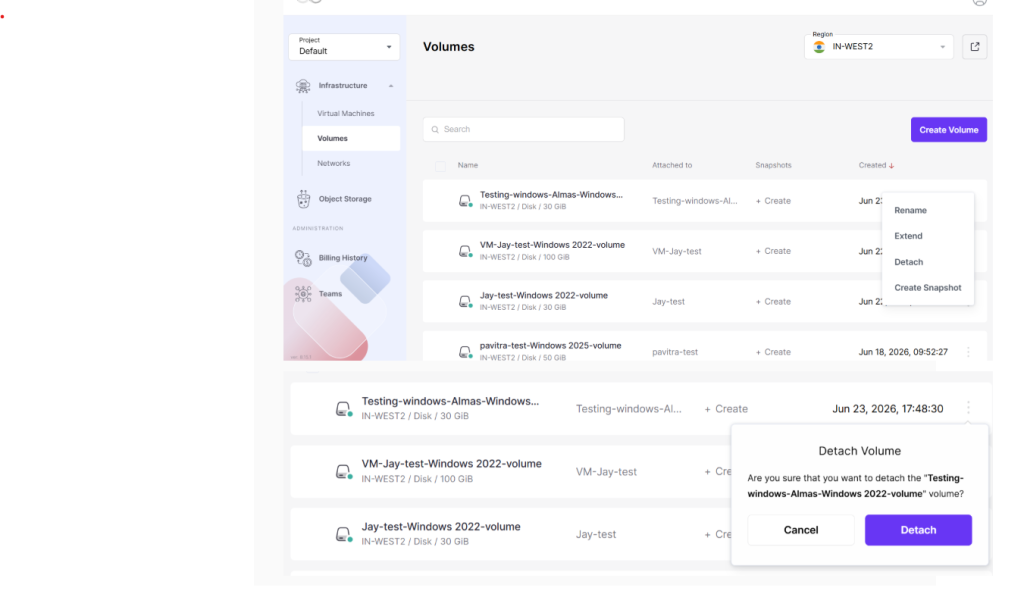
Detaching a Volume
-
Go to Compute → Volume.
-
Select the attached volume and click the three dots (⋮) menu.
-
Choose Detach.
-
Confirm the action.
-
The volume will now show as detached and can be re‑attached to another VM if required.
Summary
Attaching a volume links it to a VM for use, while detaching removes the link so the volume can be reused elsewhere. Always unmount the volume inside the VM before detaching to avoid data loss.
You can observe that the volume is detached from the virtual machine.