Every developer knows this feeling. You finish building a feature, you are excited to ship it, and then you remember you still need to fix the server, update the runtime, renew the SSL certificate and check why the deployment failed last night.
That is the gap PaaS fills.
Quick answer: PaaS for developers is a cloud platform that gives you a ready environment to write, test, deploy and scale applications. The provider manages servers, operating systems, runtimes, security patches and scaling, so you spend your time on code instead of infrastructure.
If you are new to the idea, start with our simple guide on what PaaS is. Here we will look at it from a developer’s point of view.
What Developers Usually Struggle With
Even small projects bring a long list of side tasks:
- Setting up and securing a server
- Installing the right language version and extensions
- Configuring a web server and a database
- Building a deployment process
- Watching traffic and adding resources when needed
- Fixing things at odd hours when something breaks
None of this is the product you are trying to build. It is the work around the product. A platform like our PaaS platform is made to take most of that work off your plate.
How PaaS Makes a Developer’s Day Easier
- You start coding faster. There is no long setup phase. You pick your stack, connect your project and your environment is ready. This is a big help when you are testing an idea or working to a deadline.
- Deployment becomes simple. Most PaaS platforms connect with Git, so pushing code can trigger a build and a release. That means fewer manual steps and fewer chances to make a mistake. If you want to see what happens behind the scenes, read our guide on how PaaS works.
- Your environments stay consistent. “It works on my machine” is a classic problem. When development, staging and production run on the same kind of managed environment, many of those surprises disappear.
- Databases are ready to use. Instead of installing and tuning a database yourself, you connect to a managed one. We offer MySQL hosting, PostgreSQL hosting, MariaDB hosting and MongoDB hosting, all listed on our database page.
- Scaling is not a late night job. When traffic grows, the platform can add resources. When it drops, resources come back down. You do not have to guess capacity in advance.
- Security basics are covered. Patching, firewalls and SSL are handled at the platform level. You still need to write secure code, but you are not also running the server security by hand.
Stacks You Can Use
Developers rarely want a platform that forces one language. On our application hosting page you can see the environments we support. Two popular ones are:
- PHP hosting for classic PHP sites and apps
- Laravel hosting for Laravel projects that need a tuned environment
If your app also stores uploads, reports or media, our file storage service works alongside it, and you can see the wider storage options too.
A Simple Developer Workflow on PaaS
- Create your application environment
- Connect your code repository
- Add environment variables for secrets and settings
- Attach a managed database
- Deploy and test
- Watch performance and push updates the same way
Notice that none of these steps ask you to log in to a server and patch it by hand.
What PaaS Does Not Do for You
It helps to be honest here. PaaS does not write your application, fix slow queries or remove the need for good coding habits. You still own your code quality, your database design and your testing.
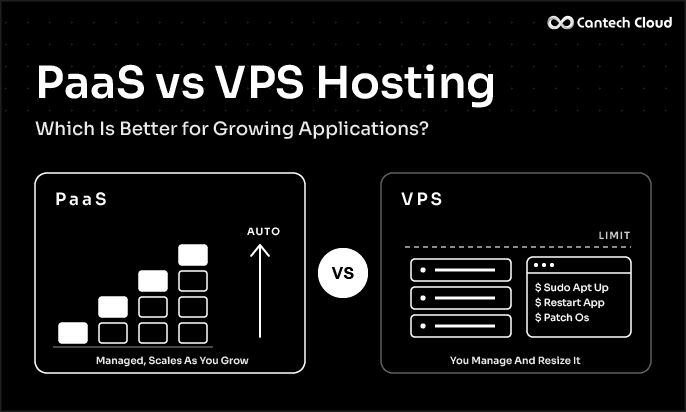
PaaS is also not the only valid choice. A VPS or a dedicated server gives you deep control, and that is exactly what some projects need. We cover how to choose in our guide on PaaS vs VPS hosting.
Who Should Consider PaaS
- Solo developers and freelancers who want to ship without a DevOps team
- Startups building and changing a product quickly
- Agencies running many client projects
- Teams that want to spend less on maintenance
CANTECH CLOUD PAAS
Find the Right PaaS Setup for Your Business
Share your needs with our team and we will help you choose a platform that fits your data, budget and growth plans.
Final Thoughts
PaaS for developers is about removing the work that does not move your product forward. When the environment, deployment and scaling are handled, you can focus on writing better features and fixing real problems.
Want to try it? Explore our PaaS platform or look at our PaaS pricing to find a fit for your project.
Frequently Asked Questions
Is PaaS good for beginners? Yes. Because the platform handles server setup, beginners can deploy a real application without learning every infrastructure detail first.
Can I use my own Git repository with PaaS? Most platforms support Git based deployment. Check the details of your chosen platform and plan before you start.
Will I lose control of my application on PaaS? No. You still control your code, your database and your settings. What you give up is day to day server management.
Does PaaS work for big applications? Yes, many production applications run on PaaS. The key is choosing a platform that scales well and supports your stack.