1. Overview
This guide explains how to whitelist an IP address using ConfigServer Security & Firewall (CSF) in WHM.
2. Whitelist an IP Address
Step 1: Log In to WHM
Log in to WHM using the root account.
Step 2: Open ConfigServer Security & Firewall
Navigate to:
WHM → Plugins → ConfigServer Security & Firewall
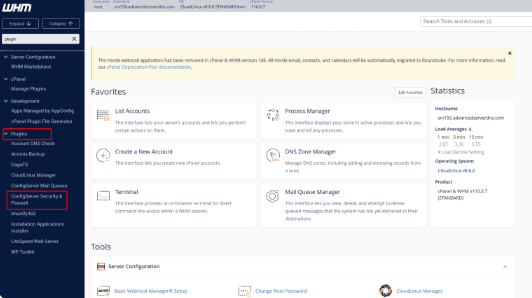
Step 3: Add the IP Address
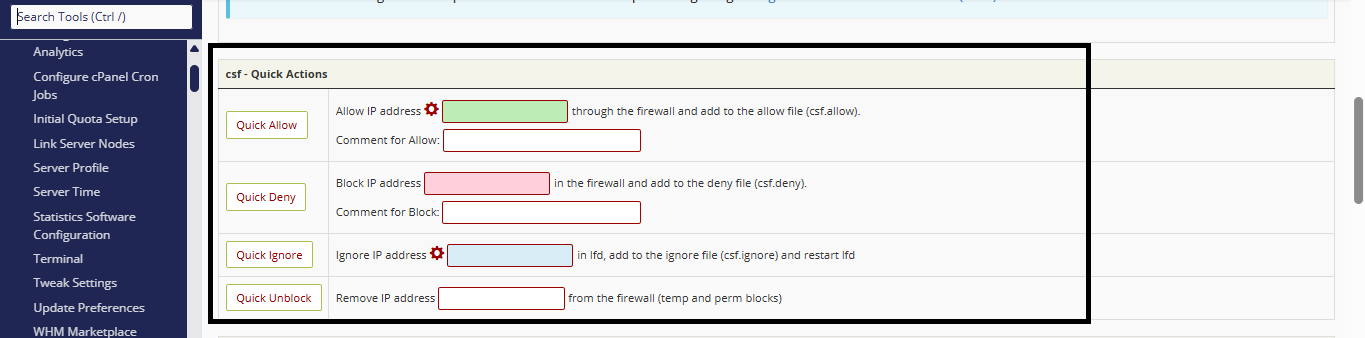
- Locate the text box next to the Quick Allow button.
- Enter the IP address that you want to whitelist.
- Click Quick Allow.
3. Additional Options
Quick Deny
The Quick Deny option can be used to block an IP address from accessing the server.
Quick Ignore
The Quick Ignore option also allows an IP address, similar to Quick Allow, but with different behavior.
- Quick Allow: The IP address is whitelisted. However, it can still be blocked later if it triggers ModSecurity rules or exceeds the allowed number of failed login attempts.
- Quick Ignore: The IP address is excluded from blocking. It will not be blocked by ModSecurity or LFD (Login Failure Daemon), even if it triggers security rules or repeated login failures.